

A technician marks a pump replacement "complete," logs a chlorine reading of 47 ppm, closes the ticket in four minutes flat, and drives to the next stop. Three weeks later a customer disputes the charge because the pump they were billed for is still sitting in the garage, uninstalled. Now you're pulling records, calling the tech, and eating a credit because there's no clean evidence trail.
That 47 ppm reading? Physically implausible. That four-minute pump swap? Impossible. Both were sitting in your system as "valid" data because nothing checked them at the moment they were entered.
This is the gap most pool service operations never close. Field data quality isn't about training techs to be more careful — careful people still fat-finger a decimal, skip a photo when it's 104 degrees out, or round a time entry. It's about building validation rules that reject bad data at the point of entry, prompt the tech to fix it while they're still standing at the pad, and escalate the handful of cases that actually need a human to look at.
Below is exactly how to build that, with specific rules you can deploy this week.
Why field data goes bad in the first place
The mistake owners make is assuming report errors come from lazy or dishonest techs. A few do. Most aren't the problem.
In real operations, bad field data clusters around four predictable causes:
-
Speed pressure. A tech running 14 stops is racing daylight. Data entry gets shortchanged first.
-
Ambiguous fields. A "chlorine" field with no unit label invites someone to type ppm in one entry and a percentage in the next.
-
Autofill and carryover. Many apps pre-populate last visit's readings. Tech taps through, and last week's numbers become this week's "measurements."
-
No feedback loop. The tech never finds out their entry was wrong, so the same mistake repeats for months.
The pattern worth internalizing: the error is cheap to fix at the pad and expensive to fix anywhere else. A prompt that says "Chlorine of 47 ppm is outside the normal range — confirm or correct" costs the tech ten seconds. That same bad number, three weeks later, costs you a dispute, a truck roll, and a chunk of trust.
Validation rules exist to move the correction from "three weeks later" to "right now."
The three families of rules that catch most problems
Almost every useful audit rule falls into one of three categories. You don't need dozens — you need a tight set that covers the failure modes that actually cost you money.
Eliminate missed appointments and dispatch delays.
Splshly ensures every pool service is scheduled, tracked, and completed efficiently.
- Unified scheduling dashboard
- Automated customer reminders
- Technician route optimization
No credit card required
1. Numeric range validation
Every measured value has a plausible band. Anything outside it is either a typo or a real emergency, and both deserve a prompt.
| Field | Plausible range | Flag if outside | Likely cause when flagged |
|---|---|---|---|
| Free chlorine | 0–10 ppm (residential) | > 10 or negative | Decimal error, unit confusion |
| pH | 6.8–8.4 | < 6.5 or > 9.0 | Test strip misread, typo |
| Total alkalinity | 40–180 ppm | > 240 | Transposed digits |
| Water temp | 45–105°F | > 110 or < 40 | Sensor error, wrong field |
| Cyanuric acid | 0–100 ppm | > 150 | Reading off scale, guess |
| Filter pressure | 5–40 PSI | > 50 | Gauge misread |
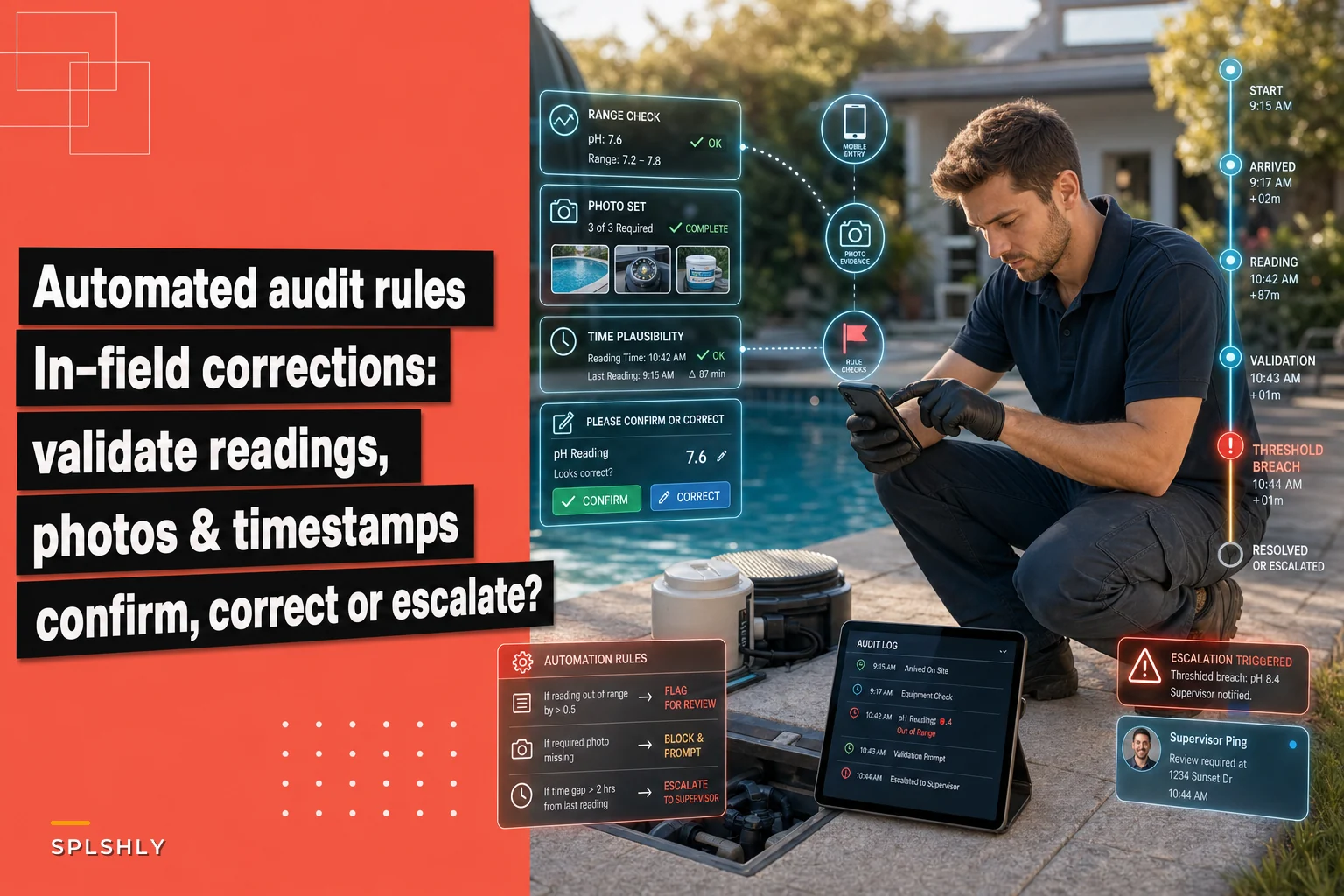
The rule isn't "block the entry." A chlorine of 12 ppm after a shock treatment is real. The rule is: when a value falls outside the band, force a confirmation step. The tech either corrects the typo or taps "confirmed — see notes" and explains. Now you have an intentional, defensible data point instead of a silent error.
One thing worth flagging here: set your ranges by pool type and context. Commercial pools, spas, and freshly shocked water all have different plausible bands. A single global range generates enough false flags that techs learn to ignore them — which defeats the whole point.
2. Required-evidence rules (shots and fields)
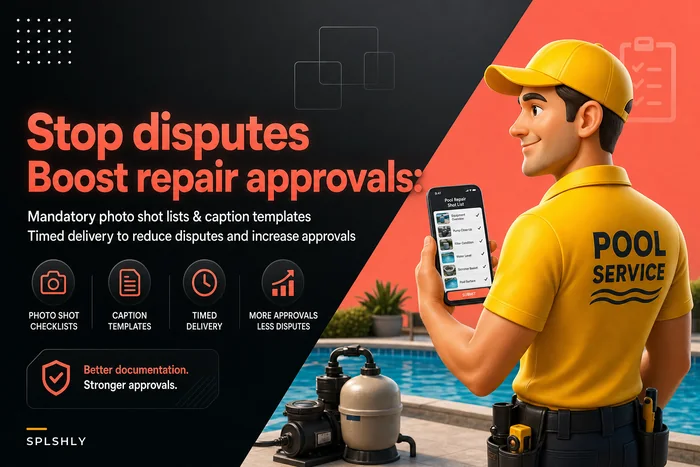
Certain job types shouldn't be closeable without specific proof. If your team already uses defined photo shot lists and caption templates, the validation layer just enforces them.
-
Equipment replacement → before photo of old part, after photo of installed part, photo of model/serial plate, disposal note.
-
Chemical dosing above a threshold → photo of the container used, quantity field required, post-treatment reading required.
-
Green-to-clean / remediation → arrival photo, mid-progress photo, departure photo.
-
Leak repair → location photo, repair photo, pressure-test result.
The rule: the "Complete" button stays greyed out until the evidence for that job type exists. No before photo on a pump swap? Ticket won't close. That single constraint eliminates the "was the part actually installed" dispute almost entirely, because there's no path to closing the job without proof.
3. Time-on-site plausibility
This is the rule most operations skip, and it's one of the more revealing checks. Cross-reference the logged time on site against the work claimed.
If GPS or app data shows a tech was at an address for six minutes but the ticket claims a filter cleaning, a chemical balance, and a skimmer basket replacement — that's not physically possible. Flag it.
-
Standard maintenance visit
~15–25 min
-
Cartridge filter clean
+10–15 min
-
Pump replacement
+30–45 min
-
Green-to-clean assessment
+20 min
When claimed work would take 50 minutes but the tech was on-site for 12, you're either looking at padded work descriptions or a rushed visit where corners got cut. Both matter. The prompt asks the tech to confirm before closing, and repeated flags feed into a coaching conversation — not an accusation.
In-field correction prompts: get the wording right
The correction prompt is where this whole system lives or dies. Get the tone wrong and techs either rage-tap through every warning or start gaming the fields to avoid them.
-
It's specific. "Chlorine reading of 47 ppm is above the expected range (0–10). Confirm the reading or correct it." Not a generic "Are you sure?"
-
It offers a fast path for both cases. One tap to correct, one tap to confirm-with-note. Never make confirming a legitimate outlier feel like punishment.
-
It happens immediately. The prompt fires the moment the field loses focus, not at ticket submission. Fixing it in context takes seconds; fixing it at the end means re-remembering what you saw at a pad you're already driving away from.
A pattern worth avoiding: prompts that only appear at submit time. By then the tech is in the truck, the equipment is behind them, and "confirm or correct" becomes "just confirm so I can leave." You've trained them to rubber-stamp errors.
Escalation thresholds: when a flag becomes a human's problem
Not every flagged entry needs a manager. Most get resolved by the tech in-field. The skill is defining which ones bubble up.
A workable escalation ladder:
-
Level 0 — Auto-resolve. Tech corrects the entry in-field. No record beyond the correction. (The vast majority.)
-
Level 1 — Confirmed outlier. Tech confirms an out-of-range value with a note. Logged for review but no immediate action.
-
Level 2 — Repeated pattern. Same tech, same flag type, 3+ times in a week. Routes to a supervisor for a coaching touch, not a disciplinary one.
-
Level 3 — Hard block. Missing required safety evidence, or a value that implies a hazard (e.g., a filter pressure suggesting an over-pressurized system). Ticket cannot close; dispatcher or lead is notified in real time.
Level 3 is where this ties directly into safety and liability. When a reading or missing photo implies real risk, you don't want the tech to have discretion to close it — you want it escalated with the evidence package and timeline SLAs already attached so whoever picks it up has everything they need.
The threshold you set on Level 2 matters more than people expect. Set it too tight and supervisors drown in noise. Too loose and patterns slip by for months. Three flags of the same type in a rolling week is a reasonable starting point — tune from there based on how much real signal you get versus how much noise.
A starter set of audit rules you can deploy
If you want something concrete to hand your ops lead, here's a workable ruleset. Start narrow, watch what flags, then expand.
-
Chlorine outside 0–10 ppm (residential) prompt to confirm/correct in-field.
-
pH outside 6.8–8.4 prompt to confirm/correct.
-
Any reading identical to the prior visit across all four core chemistry fields: flag as possible carryover, require re-entry.
-
Time on site under 8 minutes for a full maintenance visit prompt for confirmation.
-
Claimed task duration exceeds actual dwell time by more than 2x flag for review.
-
Equipment replacement ticket without before AND after photos hard block on close.
-
Chemical dose above threshold without container photo and quantity hard block on close.
-
Filter pressure over 50 PSI Level 3 escalation — notify lead.
-
Same-tech, same-flag 3x in rolling 7 days route to supervisor.
-
Any "confirmed outlier" with a blank note reject; note is mandatory.
Only a couple of these are hard blocks. Most are prompts. The philosophy: friction where it prevents real harm, speed everywhere else. Overload techs with hard blocks and you'll get workarounds — the tech who starts entering dummy values or fake photos just to get past the wall. That's a worse outcome than no validation at all.
Start with ten rules. Watch what flags. Fix the ranges. Then expand.
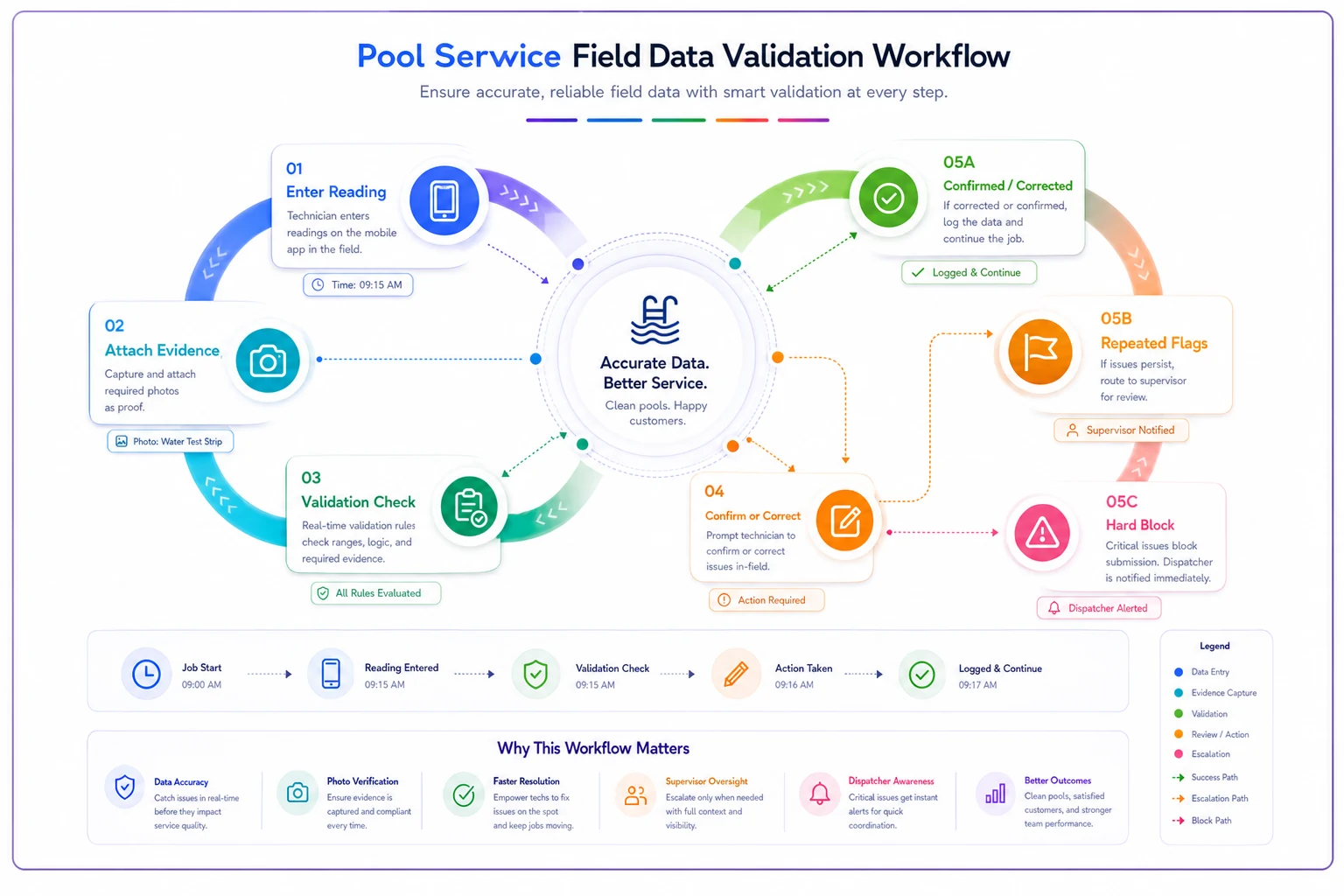
Here's a simple workflow to validate entries in-field before escalation:
Only a couple of these are hard blocks. Most are prompts. The philosophy: friction where it prevents real harm, speed everywhere else. Overload techs with hard blocks and you'll get workarounds — the tech who starts entering dummy values or fake photos just to get past the wall. That's a worse outcome than no validation at all.
A real scenario
A mid-sized residential pool company running around 8 trucks and somewhere north of 300 recurring accounts was eating a steady stream of billing disputes — roughly 6–9 a month tied to "was this actually done" questions on repairs and chemical charges. Each dispute burned close to an hour of office time, plus often a goodwill credit in the $40–$120 range. Add the occasional callback truck roll and it was a real, quiet drain on margins.
They deployed a slim version of the rules above — range checks on chemistry, hard blocks on equipment-swap photos, and a time-on-site plausibility flag. Nothing fancy. The first two weeks were noisy; a lot of false flags on commercial accounts until they split the ranges by pool type.
After about two months, disputes tied to missing evidence dropped to one or two a month, and most of those resolved quickly because the photos existed. The unexpected win was in chemistry data — carryover flags surfaced that a couple of techs had been tapping through pre-filled readings for weeks. The historical water data on those accounts had been quietly worthless. Fixing that improved actual service decisions, not just billing paperwork.
No dramatic revenue swing. Fewer credits, less office firefighting, and cleaner data feeding everything downstream.
When this makes sense — and when it doesn't
Deploy this when:
-
You're running enough volume that manually reviewing every ticket isn't feasible.
-
Disputes or callbacks tied to missing or implausible data are a recurring line item.
-
Techs are entering data through a mobile app in the field, not paper transferred later.
Hold off when:
-
You're a one or two-truck operation where the owner personally reviews every ticket. The validation overhead may not pay for itself yet.
-
Your field app can't fire real-time prompts. Batch validation at end-of-day is far weaker — you've lost the in-context correction that makes this work.
Who should not do this: anyone planning to use flag data punitively out of the gate. The moment techs believe every prompt is building a case against them, they optimize for clean-looking data instead of accurate data. That's worse than no validation at all. Frame it as "the app catches typos before they cost you a callback," because that's genuinely what it does.
Rolling it out without a revolt
A few practical notes from how these deployments tend to go:
-
Ship prompts before blocks. Run everything as a confirm/correct prompt for the first few weeks. Watch flag rates. Only convert to hard blocks once you've tuned out the false positives.
-
Split your ranges early. Residential, commercial, and spa should not share chemistry bands. This is the single biggest source of false-flag frustration.
-
Feed the flags back to techs. A tech who never learns their entry was flagged learns nothing. A short weekly summary — "here's what got caught this week" — turns validation into training. This pairs naturally with the way a living technician knowledge base captures recurring fixes and turns them into quick microtraining.
Ship prompts in confirm mode first so you can tune false positives before adding hard blocks.
Make the "confirm outlier" path fast. Legitimate outliers happen daily. If confirming one is painful, techs will start entering fake in-range numbers to avoid the friction.
The point isn't catching liars
The reason this works isn't that it exposes bad techs. It's that it removes the silent error — the plausible-looking number that nobody questions until it's already cost you a dispute or a truck roll.
Good field data isn't a training problem you solve with a meeting. It's a system that checks the work at the exact moment it's easiest to fix, prompts a correction while the tech is still standing at the equipment, and escalates only the handful of cases that genuinely need a second set of eyes. Build those rules once, tune them for a month, and the disputes, callbacks, and worthless historical readings start drying up on their own.
Start with ten rules. Watch what flags. Fix the ranges. Then expand.
Ready to elevate your pool service business?
Join hundreds of pool service professionals using Splshly to save time, optimize routes, and enhance customer satisfaction.