

The problem with storm waves isn't the volume by itself. It's that every caller thinks their situation is the emergency, the phones ring for six hours straight, and your dispatcher ends up scheduling trucks by whoever sounded most panicked. Meanwhile the actually dangerous jobs — energized equipment sitting in standing water, a cracked bond wire, a screen enclosure hanging over the deep end — get buried under fifty calls about green water and floating patio furniture.
A good triage system fixes the ordering, not the volume. You still get 80 calls in a morning after a bad line of storms rolls through. But instead of a first-come, first-served scramble, you get a queue sorted by risk, with the right parts already staged and the right tech assigned. That's the whole game.
This is written for the person actually answering the phone during a storm wave, and the tech who shows up after. Owners can build the rules; dispatchers have to run them under pressure.
Start with the intake script, because memory fails at call #40
The single biggest failure point isn't diagnosis. It's inconsistent intake. Your dispatcher asks great questions on call 3 and forgets half of them by call 30 because they're tired and the phone won't stop. Then a tech rolls up to a job with no idea whether the pump was submerged, and burns 20 minutes on the phone from the driveway.
Fix this by scripting the intake so it's the same every call, storm or not. The order matters — safety questions first, always, before you ever get into "how green is it."
Here's the core intake block a dispatcher should run through, top to bottom:
Safety screen (ask these first, every time):
-
Is there any equipment sitting in standing water right now — pump, heater, timer box, subpanel?
-
Do you smell anything burning, or has a breaker tripped and won't reset?
-
Is the pool screen enclosure, a tree, or any structure leaning over or fallen into the pool?
-
Are there downed power lines anywhere near the pool or equipment pad?
-
Is anyone using the pool, or do you have kids/pets with access to it right now?
Property and access:
-
Is your street/driveway clear, or is there flooding, debris, or a tree blocking access?
-
Do we have gate code / lock info on file, and is the gate physically openable?
Pool condition:
-
What color is the water — clear, hazy, green, brown/muddy, or black?
-
Is the water level over the skimmer, at the tile line, or overflowing the deck?
-
Is the pump currently running? Do you know if power to the equipment is on?
Debris load:
-
What's in the pool — leaves/branches, whole tree limbs, patio furniture, roof material, mud/silt?
-
Any chance of chemicals, fuel, or a grill/propane tank in the water?
The property questions aren't filler. In real operations, wasted trips after a storm come from access problems more than pool problems — a tech drives 40 minutes to a house where a downed oak is still blocking the driveway. Screen for that before you dispatch, not after.
The risk tiers: separate what's dangerous from what's just ugly
Once you have consistent intake data, you sort every call into a tier. The mistake most shops make is treating "urgent to the customer" and "actually urgent" as the same thing. A homeowner with a swamp-green pool and a pool party Saturday feels like a P1. Electrically, they're a P3.
Eliminate missed appointments and dispatch delays.
Splshly ensures every pool service is scheduled, tracked, and completed efficiently.
- Unified scheduling dashboard
- Automated customer reminders
- Technician route optimization
No credit card required
Build your tiers around three separate axes: safety, equipment damage risk, and cosmetic. A single call can score high on one and low on the others — and the highest axis wins for routing.
| Tier | What triggers it | Response window | Who goes |
|---|---|---|---|
| T1 — Safety | Energized equipment in water, burning smell, downed lines, structure in pool, unsecured pool with kid/pet access | Same day; power-off guidance immediately by phone | Senior tech or electrical-capable; may need utility/electrician first |
| T2 — Equipment at risk | Submerged-but-de-energized motor/heater, pump running dry, water over skimmer risking overflow into equipment, filter overloaded with silt | 24–48 hrs | Any qualified tech, parts staged |
| T3 — Cosmetic / water quality | Green or muddy water, heavy leaf load, clarity issues, chemistry off but equipment fine | 3–7 days, batched into storm route | Standard route tech |
| T4 — Deferred | Minor debris, cosmetic staining, non-urgent cleanup customer can partially handle | Next regular service or scheduled | Standard route |
This table earns its keep because it stops dispatchers from arguing with themselves. When the intake answers point to "pump was underwater and the breaker won't reset," that's T1 the moment those words come out — no debate, no "let me squeeze them in Thursday."
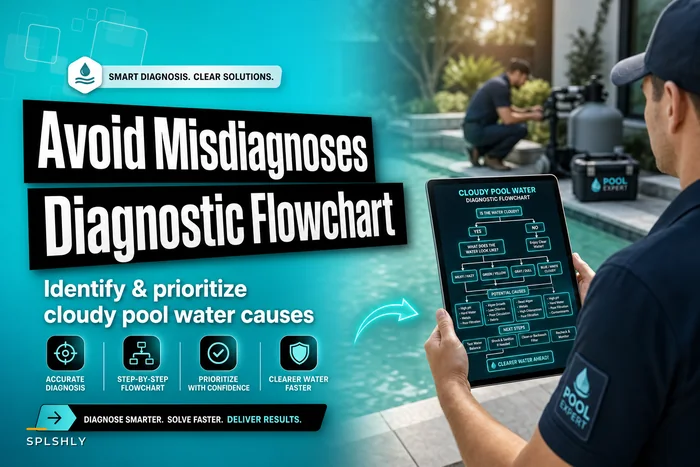
One pattern worth flagging: muddy/brown water after a storm usually means silt and runoff, which is a filter-and-clarity job. Black water or an oily sheen is a different animal entirely and should bump your caution level. Treat anything suggesting fuel or chemical contamination as a T1 hold, not a T3 cleanup. If you want to get sharper on separating water-quality causes before dispatching, the diagnostic flowchart for cloudy pool water causes pairs well with this triage step.
Temporary mitigation: what the tech can safely do now vs. what waits
Triage isn't only about routing trucks. Half the value is in what your dispatcher tells the homeowner to do — or not do — while they wait, and what a tech does as a stopgap when the full repair can't happen on the first visit.
Split mitigation into two buckets: phone-guided homeowner actions and tech temporary fixes.
Phone-guided (dispatcher tells homeowner):
-
If equipment was submerged or a breaker tripped
leave the breaker OFF. Do not reset it, do not run the pump. This is the single most important sentence a dispatcher says during a storm wave.
-
Keep everyone out of the pool until a tech confirms bonding and water safety.
-
If the pool is overflowing toward the equipment pad and it's safe to reach, lower water via the deck drain or a submersible pump — but only if no electrical hazard is present.
-
Don't dump a bucket of shock in "to fix the green." It won't, and it complicates the tech's chemistry balance later.
Tech temporary fixes (when full repair can't happen same visit):
-
Bypass or clean a silt-clogged filter and run on recirculate to protect the media until a proper cleaning or cartridge swap.
-
Manually remove large debris so the skimmer and pump aren't fighting a tree limb.
-
Kill power at the pad and tag it out if equipment is suspect, rather than leaving it in a maybe-on state.
-
Add a temporary sequestrant/clarifier for muddy water so the system can start clearing while parts are ordered.
-
Secure or flag a compromised enclosure section so it isn't a repeat hazard.
The judgment call techs get wrong most often: running a motor "just to see" after it was underwater. A submerged motor that gets energized can fail immediately or, worse, energize the water. The temporary fix here is doing nothing to the electrical and documenting it for a proper teardown. Slower is correct.
Routing and parts bundling for a storm wave
Individual triage is step one. The bigger operational win during a storm wave is bundling — grouping jobs by geography and by likely parts so you're not sending trucks back to the warehouse three times a day.
Storms hit in bands. The same neighborhood gets the same debris load, the same overflow issues, the same silted filters. That means jobs cluster naturally, and your parts needs cluster too. A dispatcher who sees six T3 muddy-water calls in one subdivision should be thinking: one truck, one route, a case of clarifier, spare cartridges, and filter media all loaded before the truck leaves.
-
Batch all intake for the first 2–3 hours before dispatching anything non-T1. T1 safety calls go out immediately. Everything else waits briefly so you can see the map fill in. This feels wrong under pressure but prevents ping-ponging trucks across town.
-
Plot T2/T3 calls by geography. Clusters become routes. Isolated calls get slotted into the nearest cluster's day.
-
Predict the parts bundle per cluster. Muddy-water clusters → clarifier, media, cartridges. Overflow clusters → check valves, timer/subpanel replacements. Debris clusters → nets, more labor time, less parts.
-
Stage parts to the truck for the whole cluster, not per job. Over-stock slightly; a storm route with a return trip for one cartridge kills your throughput.
-
Assign T1 electrical work to your capable techs only, and keep one senior tech unrouted as a floater for the T1 calls that keep coming in through the day.
-
Re-triage the queue every few hours. Storm calls don't arrive all at once, and a T3 can become a T1 if a homeowner resets that breaker you told them to leave alone.
Batch all intake for the first 2–3 hours before dispatching anything non-T1.
The overbooking risk here is real. Emergency waves tempt you to cram every call into the next two days, and then your recurring maintenance customers get skipped and you create a second problem. Balancing the surge against your normal book is its own discipline — the scheduling rulebook for balancing recurring, seasonal and emergency visits is worth revisiting before storm season, not during it.
Below is a simplified view of how a storm call moves through the system from intake to truck dispatch:
Incoming storm call ↓ Safety screen (dispatcher intake script) ↓ Tier assigned (T1 / T2 / T3 / T4) ↓ T1? → Immediate dispatch + phone mitigation guidance ↓ T2/T3? → Hold for 2–3 hr batch window ↓ Geography clustering → Route built ↓ Parts bundle staged per cluster ↓ Truck dispatched ↓ Re-triage queue every few hours for new calls or tier changes
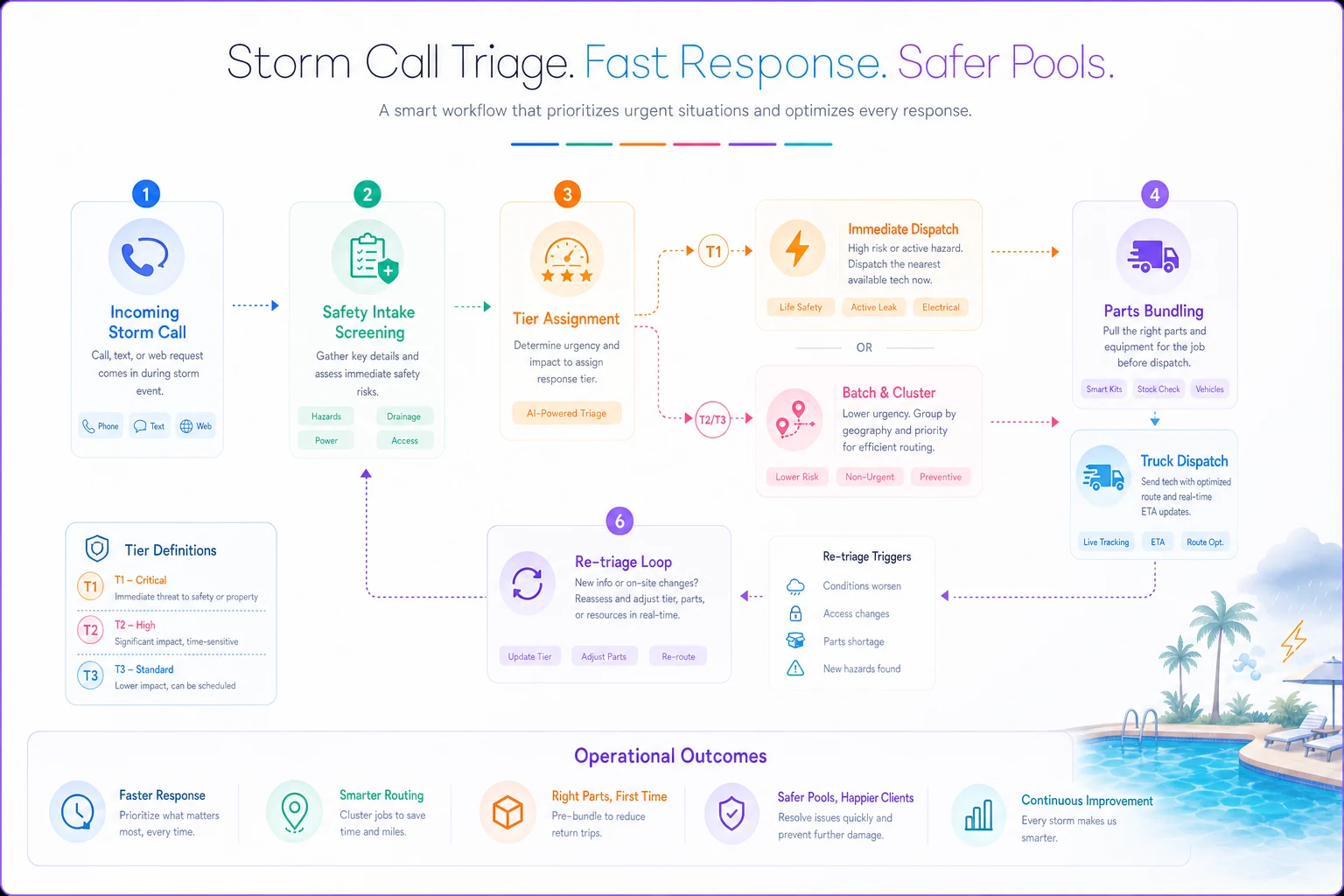
Getting this flow consistent is the difference between a dispatcher who's managing the wave and one who's just reacting to it.
A real scenario: how the queue shakes out
A mid-size service company running around 340 accounts got hit by an overnight line of storms that flooded a handful of neighborhoods. By 8 a.m. the phones had roughly 60 calls waiting.
Before they had a triage script, a morning like this meant scheduling by panic level. The owner found out at noon that a call about a "tripping breaker and burning smell" had been slotted two days out behind a stack of green-water complaints. That's not a hypothetical — that's the exact failure mode that turns into a liability conversation.
With a scripted intake and tiers in place, those same 60 calls sorted into about 5 T1 safety jobs, around 15 T2 equipment-at-risk, and the rest T3/T4 cosmetic. The five T1s went out immediately, with power-off instructions given on the phone before anyone rolled. The T2s and T3s clustered into four neighborhood routes over two days. Filter media and clarifier got staged by cluster instead of pulled job-by-job.
The measurable difference showed up in wasted trips and callbacks. Return trips for missing parts dropped noticeably across the storm week, and — more importantly — nothing dangerous sat unaddressed while the crew chased ugly-but-harmless pools. The owner's estimate was they cleared the wave in roughly two-thirds the time it would've taken the old way, with zero "why did you leave the burning-smell house for Thursday" conversations.
Where a workflow platform actually helps here
You can run all of this on paper and a whiteboard. Plenty of shops do, and for a couple of trucks it's fine. Where it breaks down is consistency under load — the dispatcher skipping safety questions on call 40, the tier logic living in one person's head, the parts bundle that got forgotten because it was 7 a.m. and the phone wouldn't stop.
This is the narrow spot where AI-assisted operational software earns its place: enforcing the intake script so safety questions can't be skipped, auto-tagging calls into tiers based on the answers, and grouping jobs by geography and predicted parts so the dispatcher isn't doing map math by hand during a surge. The point isn't automation for its own sake — it's that the rules you build during calm weather actually get followed during the wave, when human memory is the weakest link. A platform that captures intake, applies your tier rules, and surfaces the cluster's parts bundle turns a good dispatcher's best day into every dispatcher's normal day.
That's the honest use case. It doesn't replace judgment on a live electrical hazard. It makes sure the boring, repeatable parts — script consistency, tiering, parts staging — happen the same way whether it's the third call or the sixtieth.
When a formal triage system is overkill
If you're running one or two trucks and the owner answers the phone, you probably don't need tiers written on a wall. You already carry the whole picture in your head, and building a heavy system for that scale creates more overhead than it's worth.
Where it stops being optional is somewhere around the point you've got multiple techs, a non-owner answering phones, and enough accounts that a storm generates more calls than one person can hold in memory. That's when inconsistent intake and panic-scheduling start costing real money and, occasionally, creating real safety exposure.
The tiers and scripts above do scale down, though. Even a two-truck shop benefits from the one rule that matters most: safety questions first, breaker stays off, and the dangerous jobs never sit in the queue behind the ugly ones. Everything else is refinement. Get that ordering right before storm season starts, and you've solved the part of post-storm triage that actually hurts people and equipment.
Get that ordering right before storm season starts, and you've solved the part of post-storm triage that actually hurts people and equipment.
Ready to elevate your pool service business?
Join hundreds of pool service professionals using Splshly to save time, optimize routes, and enhance customer satisfaction.