



If you've already read the Pool Service Operations Benchmark: Seasonal Capacity, Repeat Visits and Truck-Stock Readiness, you know what the metrics mean. This appendix is the other half of that work: the boring, essential plumbing that decides whether your numbers are trustworthy or garbage.
The benchmark doesn't change. Your export does. The goal here is to give your data team — or whoever ends up doing this, even if that's you at 9pm with a CSV open — a concrete spec they can build against so the numbers line up cleanly without manual cleanup every month.
Most of the pain in benchmarking isn't the math. It's that the data coming out of pool management systems is inconsistent in ways nobody notices until the totals don't reconcile. A tech marks a job "complete" but the completed_at timestamp is null. Two trucks share one asset ID because someone duplicated a record two years ago. Chemical units are logged in gallons on some routes and liters on others. None of that breaks your software — it just quietly poisons the benchmark.
So let's spec it properly.
What the benchmark actually consumes
Before listing tables, it helps to be explicit about the shape of what the benchmark needs. It isn't one giant flat file. It's four related entities that get joined on stable keys:
-
Work orders / service visits — the core transactional record
-
Assets / pools — the thing being serviced
-
Inventory & chemical usage — what got consumed per visit
-
Technicians & routes — who did it and in what sequence
Everything else — seasonal capacity, repeat-visit ratios, truck-stock readiness — is derived from those four. If those four export cleanly, the derived metrics mostly take care of themselves.
One common mistake: teams try to export a single pre-aggregated summary ("here's our monthly repeat-visit rate") and skip the raw records. Don't. The benchmark needs row-level data so it can recompute consistently across businesses. Pre-aggregated exports are almost impossible to validate and they almost always hide a definition mismatch.
Required tables and fields
Here are the four core exports. Field names are suggestions — map your own to these. What matters is that every listed field is present, typed correctly, and populated.
Eliminate missed appointments and dispatch delays.
Splshly ensures every pool service is scheduled, tracked, and completed efficiently.
- Unified scheduling dashboard
- Automated customer reminders
- Technician route optimization
No credit card required
Table 1 — service_visits
| Field | Type | Required | Notes |
|---|---|---|---|
visit_id | string | yes | Globally unique, stable across re-exports |
asset_id | string | yes | Foreign key to assets.asset_id |
technician_id | string | yes | Foreign key to technicians.technician_id |
visit_type | enum | yes | recurring | repair | emergency | seasonalopen | seasonalclose |
scheduled_at | ISO 8601 datetime | yes | With timezone offset |
started_at | ISO 8601 datetime | no | Null allowed for no-shows |
completed_at | ISO 8601 datetime | conditional | Required if status = completed |
status | enum | yes | scheduled | completed | cancelled | no_show | rescheduled |
isrepeatvisit | boolean | no | Derived; export if you compute it, else leave null |
duration_minutes | integer | no | Prefer computed from timestamps |
revenue_amount | decimal(10,2) | no | Exclude tax; see mapping tips |
currency | string(3) | conditional | ISO 4217, required if revenue_amount present |
The two fields that cause the most trouble here are visittype and completedat. If your system doesn't distinguish an emergency visit from a recurring one, the benchmark can't separate baseline capacity from surge demand — and that distinction is the whole point of seasonal readiness.
Table 2 — assets
| Field | Type | Required | Notes |
|---|---|---|---|
asset_id | string | yes | Stable unique key |
account_type | enum | yes | residential | commercial |
postal_code | string | yes | For territory/seasonality grouping |
volume_gallons | integer | no | Normalize to gallons on export |
serviceplantier | string | no | Your internal tier label is fine |
active_from | date | no | When the pool entered service |
active_to | date | no | Null if currently active |
Worth flagging: businesses that merged a competitor's book often end up with duplicate assets under two different IDs — same address, same pool. That inflates the active-pool count and deflates the repeat-visit ratio. Dedup on address + volume before exporting, not after.
Table 3 — chemical_usage
| Field | Type | Required | Notes |
|---|---|---|---|
usage_id | string | yes | Unique |
visit_id | string | yes | FK to service_visits |
sku | string | yes | Your catalog SKU |
quantity | decimal(10,3) | yes | Positive values only |
unit | enum | yes | gal | l | lb | kg | oz | tablet |
unit_cost | decimal(10,4) | no | Per-unit cost at time of use |
The most common defect across chemical exports is mixed units with no unit column. The system "knows" a route logs in pounds, so nobody stored it. Then a new hire enters ounces and the cost-per-visit silently triples. Always export the unit explicitly, even if you're convinced it's always the same.
Table 4 — technicians
| Field | Type | Required | Notes |
|---|---|---|---|
technician_id | string | yes | Stable unique key |
homedepotid | string | no | Which branch/warehouse they stock from |
active | boolean | yes | Current employment status |
hire_date | date | no | Useful for ramp/utilization context |
Keep this one lean. You don't need names, phone numbers, or anything PII-adjacent in a benchmark export. Strip it.
Formats and conventions
A few rules that save hours of back-and-forth:
-
Timestamps ISO 8601 with offset —
2026-07-14T09:30:00-05:00. Never bare local time. Timezone ambiguity ruins any seasonal metric because an 11pm-vs-1am rollover shifts a visit into the wrong day. -
Encoding UTF-8, always. Latin-1 breaks the moment a customer name or a note field has an accented character.
-
CSV specifics Comma-delimited, double-quote text qualifier, header row required. Escape embedded quotes by doubling them.
-
Nulls Empty string in CSV,
nullin JSON. Do not use0,"N/A","-", or9999. Sentinel values are the quietest killers of average-based metrics. -
Decimals Period, not comma.
1234.50, never1.234,50. -
Currency Store minor units carefully — don't let floating point round
19.99into19.989999.
That last check is the one people skip and regret. If your export says you serviced 612 pools last month but your own system says 580, stop. One of them is wrong, and it's usually a dedup or a join problem, not a real discrepancy.
Sample payloads
CSV — service_visits.csv
visitid,assetid,technicianid,visittype,scheduledat,startedat,completedat,status,visittypedetail,durationminutes,revenueamount,currency WV-10231,AS-4410,TECH-07,recurring,2026-07-14T09:00:00-05:00,2026-07-14T09:05:00-05:00,2026-07-14T09:38:00-05:00,completed,,33,89.00,USD WV-10232,AS-4411,TECH-07,repair,2026-07-14T10:15:00-05:00,2026-07-14T10:22:00-05:00,2026-07-14T11:40:00-05:00,completed,,78,245.50,USD WV-10233,AS-4412,TECH-03,recurring,2026-07-14T08:30:00-05:00,,,noshow,,,, WV-10234,AS-4410,TECH-07,emergency,2026-07-15T14:00:00-05:00,2026-07-15T14:10:00-05:00,2026-07-15T15:05:00-05:00,completed,,55,310.00,USD
Note row WV-10233: a no-show with empty timestamps and empty revenue. That's correct. The temptation is to drop no-shows entirely, but the benchmark needs them to compute real completion rates against scheduled capacity.
JSON — nested visit with chemical usage
{ "visitid": "WV-10232", "assetid": "AS-4411", "technicianid": "TECH-07", "visittype": "repair", "scheduledat": "2026-07-14T10:15:00-05:00", "startedat": "2026-07-14T10:22:00-05:00", "completedat": "2026-07-14T11:40:00-05:00", "status": "completed", "durationminutes": 78, "revenueamount": 245.50, "currency": "USD", "chemicalusage": [ { "usageid": "CU-88121", "sku": "CHL-TAB-3IN", "quantity": 4.000, "unit": "tablet", "unitcost": 0.9500 }, { "usageid": "CU-88122", "sku": "ACID-MUR-1G", "quantity": 0.500, "unit": "gal", "unitcost": 6.2000 } ] }
Either flat-four-files or nested JSON works. What doesn't work is mixing — don't send flat CSVs for three tables and bury chemical usage inside visit notes as free text.
API export recommendations
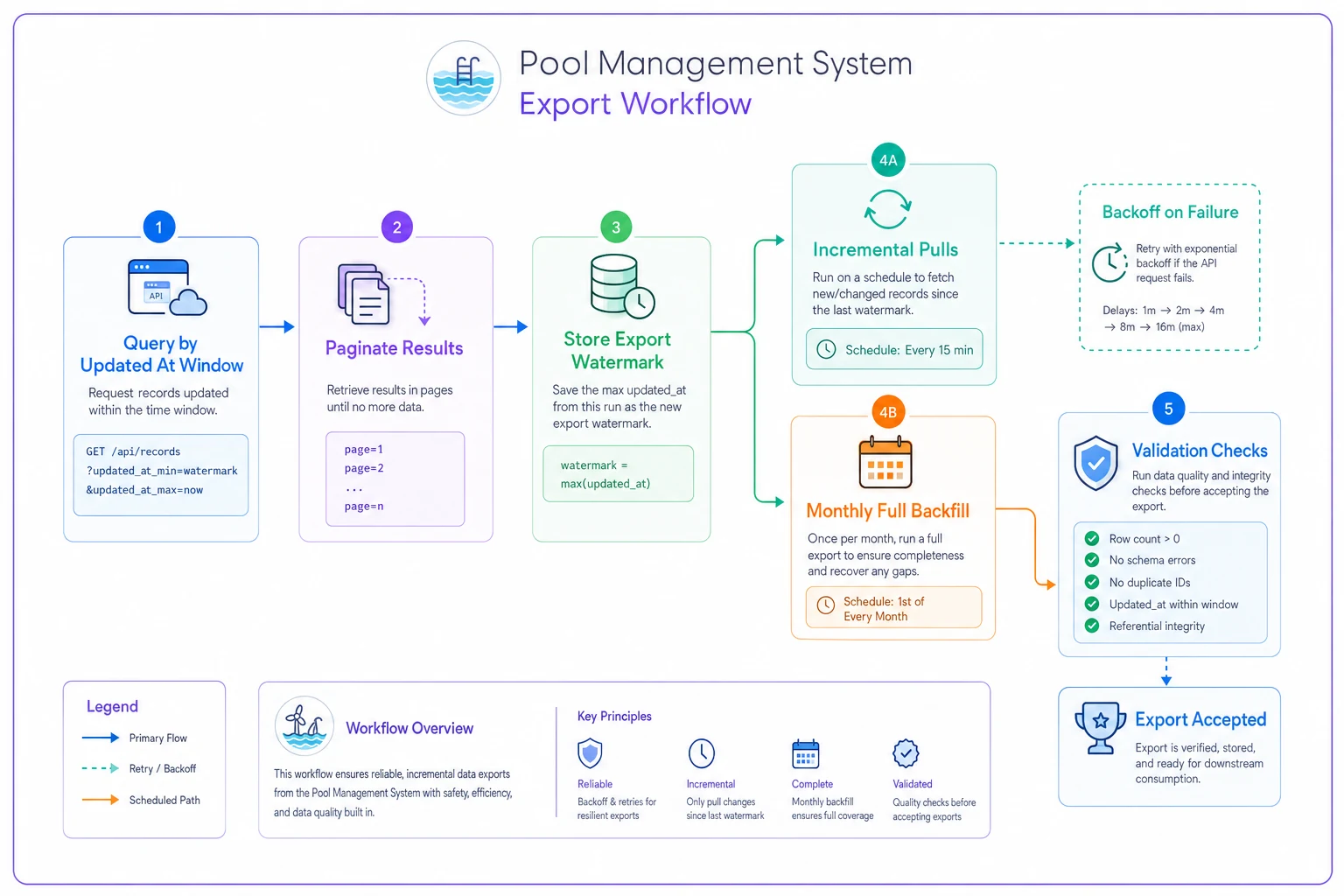
If you're pulling from a vendor's API rather than exporting flat files, a few things matter more than format:
-
Use date-ranged, paginated endpoints. Request by
updatedatwindow, notcreatedat. You want anything that changed — a visit rescheduled yesterday needs to re-export even if it was created in May. -
Export incrementally, reconcile in full periodically. Pull deltas daily or weekly, but run a full backfill monthly to catch records that changed outside your delta window (voided invoices, back-dated corrections).
-
Capture an export watermark. Store the max
updated_atyou successfully pulled and resume from there. That's what prevents gaps when a job fails halfway through. -
Respect rate limits with backoff. A full-season backfill of a five-truck operation can run to tens of thousands of rows; don't hammer the API and get throttled mid-run.
-
Version your export. Stamp each file batch with a
schemaversionandexportrun_idso you can trace which run produced which numbers when something looks off three weeks later.
Store the max
updated_atyou pulled and resume from there to avoid export gaps.
The export job that runs flawlessly for four months and then silently skips a week is far more dangerous than one that fails loudly. Loud failures get fixed. Silent gaps become "why did July look so slow?" meetings in October.
A quick diagram of the recommended export workflow:
If you haven't mapped your metrics to the benchmark definitions yet, start with the Pool Service Operations Benchmark: Seasonal Capacity, Repeat Visits and Truck-Stock Readiness and build your export schema backward from the fields it actually needs.
Validation rules (run these before you trust the export)
Build these as automated checks in your pipeline. Fail the export if any critical rule breaks.
-
Every
servicevisits.assetidresolves to a row inassets -
Every
chemicalusage.visitidresolves to a row inservice_visits -
No duplicate
visitid,assetid, orusage_id -
completed_atis present wheneverstatus = completed -
completedat >= startedat >= scheduled_at(allowing small early-start tolerance) -
All timestamps include a timezone offset
-
visit_typevalues are within the allowed enum — no free text leaking in -
chemical_usage.quantity > 0andunitis always populated -
revenue_amount >= 0, andcurrencypresent whenever revenue is -
No sentinel values (
9999,-1,"N/A") in numeric or date fields -
Active asset count matches your own dashboard within a tolerance you set
That last check is the one people skip and regret. If your export says you serviced 612 pools last month but your own system says 580, stop. One of them is wrong, and it's usually a dedup or a join problem, not a real discrepancy.
Mapping tips for common system quirks
Every pool management system models things slightly differently. Here's how to handle the recurring translation headaches.
Revenue: gross vs. net vs. invoiced. Decide once whether revenue_amount means invoiced, collected, or booked — and document it. Mixing invoiced and collected revenue across months makes repeat-customer value look unstable when it isn't. For the benchmark, invoiced-excluding-tax is usually the cleanest choice.
Visit type when your system doesn't have one. Many systems only have "service" and "repair." If that's the case, derive emergency from a priority flag or same-day scheduling, and derive seasonalopen/seasonalclose from the service template or the SKU used. Document the derivation so it's reproducible.
Repeat-visit flagging. Don't try to pre-compute isrepeatvisit if your logic is fuzzy — leave it null and let the benchmark derive it from asset_id history. A half-right repeat flag is worse than none.
Unit normalization. Pick gallons and pounds as your export standard and convert everything on the way out. Keep the original unit in a staging table so you can audit the conversion, but ship a consistent one.
Timezones for multi-region operators. If you run across two timezones, do not normalize everything to one zone before export. Keep each visit in its local offset. Seasonality is a local-time phenomenon — a 7am August open in Phoenix and in Portland are both "early," and collapsing them to UTC blurs that.
A short real scenario
A mid-sized residential operator — roughly 540 active pools, four trucks — ran their first benchmark export and got a repeat-visit ratio that looked implausibly low, somewhere around 60% when they knew most of their book was recurring. The export technically worked. Nothing errored.
Turned out two things were stacking: about 40 assets were duplicated from a book they'd acquired the prior year, and a chunk of recurring visits were logged under a generic "service" type with no distinction, so the derivation rule misread them. After deduping assets on address + volume and fixing the visit-type derivation, the ratio landed where they expected — low-to-mid 80s — and matched their own dashboards within a handful of records.
No numbers in the benchmark changed. The export got honest. That's the entire job of this appendix.
When a clean export is worth the effort — and when it isn't
Worth it: You're comparing against the benchmark more than once, you run multiple trucks, or you're making seasonal staffing and stocking decisions off these numbers. In those cases, a repeatable export pays for itself the first time it stops a bad hiring decision in June.
Probably overkill: You're a single-operator business doing a one-time curiosity check. A careful manual CSV pull with the validation checklist above is fine — you don't need an automated pipeline for a one-off.
Don't bother until you fix the source: If your underlying records are a mess — missing timestamps, no visit types, duplicate assets — exporting faster just gets you to wrong answers faster. Clean the source data first. A good export can't rescue bad input.
Closing note
The benchmark is only as good as the data you feed it, and the gap between "the export ran" and "the export is correct" is where most teams lose trust in their own numbers. Put your effort into stable keys, explicit units, timezone-aware timestamps, and a validation pass that fails loudly. Do that, and the benchmark becomes something you can actually act on season after season — not a number you squint at and quietly ignore.
If you haven't mapped your metrics to the benchmark definitions yet, start with the Pool Service Operations Benchmark: Seasonal Capacity, Repeat Visits and Truck-Stock Readiness and build your export schema backward from the fields it actually needs.
Ready to elevate your pool service business?
Join hundreds of pool service professionals using Splshly to save time, optimize routes, and enhance customer satisfaction.