



Most pool operators don't pick bad software. They pick software that looks great in the demo and then quietly fails them eight months later — usually when they try to pull a clean report, migrate to something better, or export their customer history and realize half of it is locked inside the vendor's walls.
This guide is built around that gap. Not "what is pool management software" — you already know. The real question is which features, data fields, and contract terms actually matter when you're trying to run a tight operation and measure it properly. If you've been working from the Pool Service Operations Benchmark, you already know which metrics matter. The software's job is to feed those metrics cleanly. A surprising number of platforms can't.
Here's what to evaluate, in the order that actually protects you.
Start with the data model, not the features
Almost everyone makes the same mistake: they evaluate software by walking through the booking screen and the mobile app. Those are the easy parts. Every vendor nails the demo flow.
What they don't show you is the underlying data structure. And that's the part you'll fight for years.
A pool service business generates a very specific shape of data: recurring routes, per-visit chemical readings, equipment records tied to a body of water, parts consumed per job, repeat-visit reasons, and billing tied to service plans. If the software treats a "customer" and a "pool" as the same record, you're already in trouble — because commercial clients have multiple pools, and residential clients sometimes have a pool and a spa with different chemistry.
The test that separates good from bad: ask the vendor to show you the data model for a single service visit. You want to see distinct, exportable fields for:
-
Site / body-of-water ID (separate from customer)
-
Visit timestamp and technician ID
-
Chemical readings (FC, pH, TA, CYA, salt) as individual numeric fields, not a free-text note
-
Parts/chemicals consumed, with quantity and cost
-
Repeat-visit flag and reason code
-
Service plan reference and billing status
The free-text trap is the killer in real operations. When chemical readings live inside a notes box instead of structured fields, you can never trend them, never trigger automated alerts, and never measure anything. Operators with three years of history who couldn't answer "how often does this pool drift on CYA" — because it was all buried in paragraph notes — are more common than you'd think.
Must-have features vs. nice-to-have features
Not every feature carries the same weight. A lot of buyers get distracted by flashy extras and underweight the boring stuff that actually runs the business.
Eliminate missed appointments and dispatch delays.
Splshly ensures every pool service is scheduled, tracked, and completed efficiently.
- Unified scheduling dashboard
- Automated customer reminders
- Technician route optimization
No credit card required
| Category | Must-have | Nice-to-have | Usually overrated |
|---|---|---|---|
| Scheduling | Recurring route templates, drag-reschedule, tech capacity limits | Auto-optimization suggestions | AI route "magic" with no manual override |
| Field data | Structured chemical fields, photo capture with tagging, offline mode | Voice-to-text notes | Gamified tech scoreboards |
| Billing | Service-plan auto-billing, partial-pay handling, failed-payment retries | Customer portal | Built-in accounting (usually weaker than a dedicated tool) |
| Inventory | Per-truck stock tracking, parts-per-job logging | Barcode scanning | Full warehouse MRP |
| Reporting | Raw data export (CSV/API), custom field filters | Prebuilt dashboards | "Executive insights" you can't configure |
The pattern worth noticing: the overrated column is almost always the stuff that demos well. Offline mode doesn't demo well because the showroom has wifi — but a tech standing at a pool in a dead zone with no cell signal will lose a full visit's worth of data without it. That's the feature that actually saves you, and it rarely makes the sales deck.
The integration and export layer (this is where resale value lives)
Your software's export and API capability determines whether you actually own your operation or just rent access to it. It also controls whether you can feed external benchmarking, your accountant, or a future replacement platform.
What to confirm before signing:
-
Full CSV export of every core object — customers, sites, visits, invoices, parts usage — with no row caps and no "contact support" gatekeeping.
-
API access on your plan tier, not an enterprise-only upcharge. Ask specifically which endpoints are read-only vs. read-write.
-
Webhook support for events like visit completed, invoice paid, job created — this is what lets your numbers update without manual re-entry.
-
Accounting sync (QuickBooks / Xero) that pushes line-item detail, not just invoice totals. Totals-only sync destroys your ability to analyze margin by service type.
-
Historical export on cancellation, in a machine-readable format, guaranteed in writing.
A typical example of how this goes wrong: an operator wants to calculate repeat-visit rate per route to compare against the benchmark. The platform shows the number on a dashboard but won't let them export the underlying visit records. So the figure exists but can't be verified, sliced by technician, or cross-checked. The data is visible but not usable. That's a deliberate design choice by the vendor, and it's a red flag.
If a platform can cleanly export structured visit and chemistry data, you can plug those straight into the metric definitions in the Pool Service Operations Benchmark and actually know where you stand against seasonal capacity and repeat-visit targets. If it can't export cleanly, your benchmarking is guesswork.
A workflow test every platform should pass
Features on a checklist don't tell you how the software behaves under a real day. Before deciding, walk one complete workflow end to end — ideally with you driving, not the vendor.
Here's the workflow to run: A recurring residential customer's filter fails mid-week. The front office logs the issue → a non-routine repair visit gets created and slotted without blowing up the regular route → the tech arrives, logs the failed part, photographs it, records chemistry, and marks the part consumed from truck stock → an estimate for the replacement filter is generated and sent → customer approves → a follow-up install visit is scheduled → the part is reordered because truck stock dropped below its trigger → the install completes and bills against the service plan plus the parts line.
Here's a visual workflow of that process.
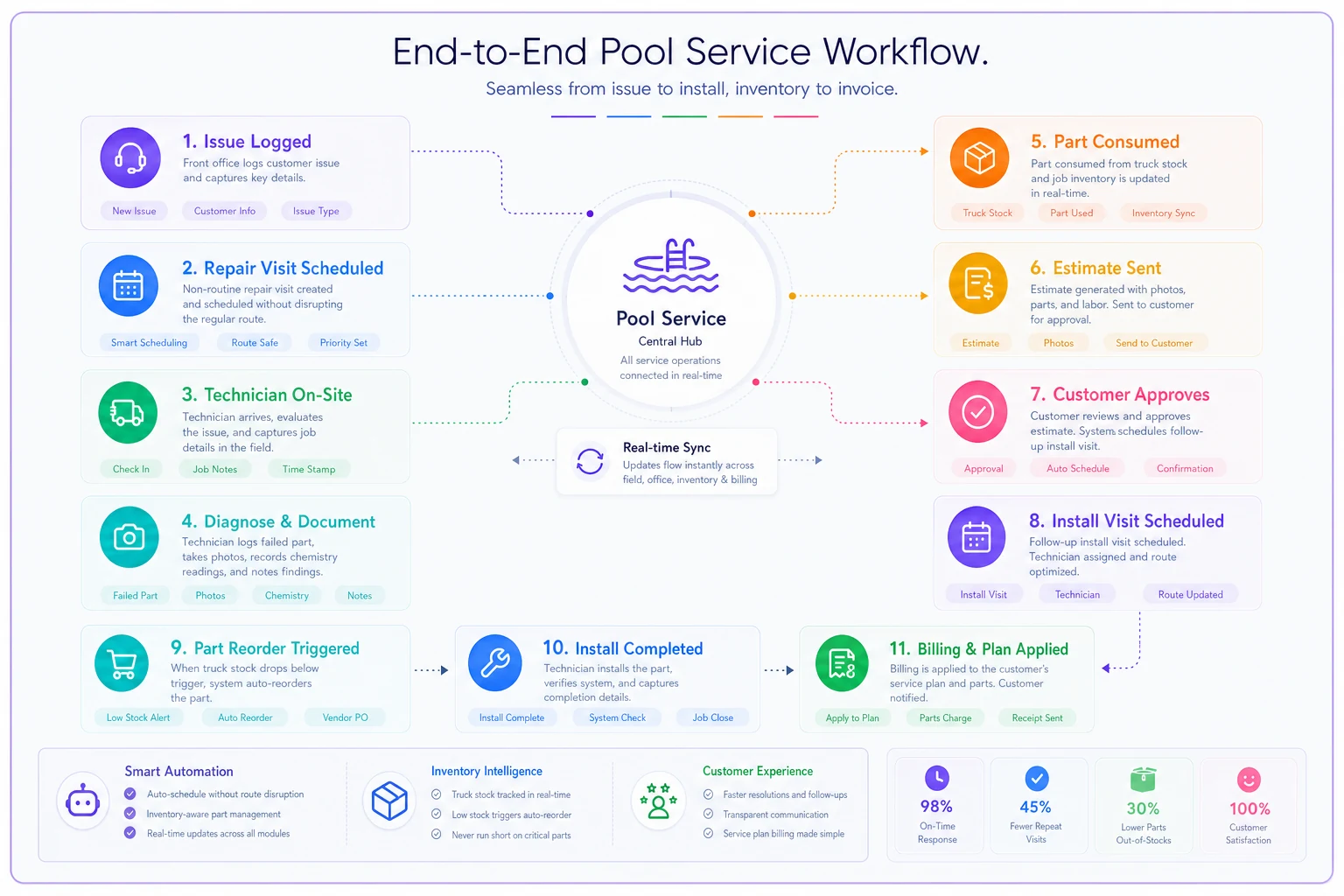
Now count how many times someone had to leave the system, re-key data, or copy something into a spreadsheet. On a clean platform, that's zero to two handoffs. On a weak one, it's five or six — and every handoff is where errors and lost billing creep in.
This single test reveals more than a two-hour feature demo. The platforms that handle it smoothly are the ones where scheduling, field data, inventory, and billing share one record instead of being bolted together.
The evaluation scorecard
Give every shortlisted vendor the same scorecard. Score each item 1–5, weight the categories, and you'll get a comparison that isn't driven by whoever had the smoothest salesperson.
Data & ownership (weight: 30%)
-
Structured chemistry fields, not free text
-
Site separate from customer
-
Full CSV export, no caps
-
API/webhook access on your tier
-
Written data-return guarantee on exit
Field operations (weight: 25%)
-
Offline mode with sync
-
Photo capture tied to the job record
-
Parts-consumed logging per visit
-
Fast mobile UI (test on a mid-range Android, not the latest iPhone)
Scheduling & routing (weight: 20%)
-
Recurring templates
-
Capacity limits per tech/day
-
Manual override on any auto-suggestion
-
Emergency/non-routine insertion without route chaos
Billing (weight: 15%)
-
Service-plan auto-billing
-
Failed-payment retry logic
-
Line-item accounting sync
Support & viability (weight: 10%)
-
Named onboarding contact
-
Response-time SLA in writing
-
How long they've been serving pool specifically
Anything scoring under 3 on a 30%-weighted data item should probably knock the vendor out, no matter how pretty the rest is. Data ownership problems don't get better after you sign.
A simple ROI template that doesn't lie to you
Vendor ROI calculators are marketing. Build your own with your real numbers. Keep it to four lines:
Annual cost of the software: license + per-seat fees + payment processing delta + onboarding. Don't forget the processing delta — some platforms bake in a higher card rate that quietly outweighs the subscription cost.
Hours saved per week on admin: be honest. If it saves your office person 6 hours a week at around $22/hr, that's roughly $6,800 a year.
Recovered revenue from fewer missed bills: platforms with service-plan auto-billing and failed-payment retries typically recover billing that used to slip. If you were losing even 1–2% of recurring revenue to missed or forgotten charges, on a $400k book that's $4k–$8k.
Reduced return trips / lost parts: harder to quantify, but if structured parts logging and better scheduling cut even a handful of return trips a month, that's real fuel, labor, and goodwill.
A realistic picture for a small operator: software runs maybe $4k–$6k a year all-in, and genuinely returns somewhere in the low five figures through recovered billing and admin time. If your honest math doesn't clear a comfortable margin over cost, either the platform is wrong or your current process isn't broken enough to justify switching yet.
Migration and training timeline
This is where good purchases turn into bad rollouts. The software was fine; the switch was rushed. A sane timeline for a small-to-mid pool operation is six to eight weeks, not a weekend.
-
Weeks 1–2 — Export and clean your current data. Pull customers, sites, recurring schedules, service plans, open balances. Fix duplicates now. Garbage in, garbage forever.
-
Week 3 — Map fields and import a test batch. Load 20–30 accounts first. Verify chemistry fields, routes, and billing map correctly before you dump everything in.
-
Week 4 — Parallel run on billing. Run one billing cycle in both the old and new system and reconcile. This catches the mismatches that would otherwise become angry customer calls.
-
Weeks 5–6 — Train office, then field. Office staff first because they fix tech mistakes. Then field techs, on the actual mobile app, standing outside, logging a real visit.
-
Weeks 7–8 — Full cutover with the old system read-only. Keep the old platform accessible but frozen for 60–90 days. You will need to look something up.
The pattern with failed migrations is almost always a skipped parallel billing run. Everything looks fine until the first real invoice cycle, and then three customers get double-billed or missed entirely, and trust in the new system evaporates before it ever had a chance.
Contract and SLA terms that protect you
The contract is where data ownership either gets protected or quietly surrendered. Read these clauses specifically, and don't accept vague language.
-
Data ownership the contract should state plainly that you own your customer and operational data, and that the vendor returns it in a usable, machine-readable format on termination — within a defined number of days.
-
Export on exit no fee to get your own data out. If there's an "export assistance fee," negotiate it out before signing.
-
Uptime SLA a real number (99.5%+ is reasonable), with a defined measurement window and a service credit if they miss it. "We aim for high availability" is not an SLA.
-
Data breach notification a committed timeline to notify you if your customer data is exposed.
-
Price-lock window at minimum a cap on renewal increases, so year two doesn't jump 40% after you're dependent.
-
No hostage clause confirm there's nothing that restricts export or locks features behind "good standing" during a billing dispute.
When this matters most
If you're a single-truck operator, the SLA probably matters less than data export — you can limp through an outage, but you can't rebuild years of history. If you're running multiple crews with commercial contracts, uptime becomes serious money, because a half-day outage during peak season stalls every route at once.
Who should wait
Not every operator needs to switch right now.
If you're running a handful of accounts and your current spreadsheet-plus-calendar setup still feels manageable, new software adds cost and migration risk without solving a real pain. The threshold where it genuinely pays off tends to be when scheduling conflicts, missed bills, or "where's that customer's history" moments start eating real hours every week.
And if your main problem is process discipline — techs not following the route, inconsistent service quality — software alone won't fix that. It'll just digitize the mess. Sort the workflow first, then buy the tool that enforces it.
A quick real scenario
A two-truck residential operator with roughly 280 recurring accounts was running scheduling in a shared calendar and billing by hand each month. The recurring problems: a handful of accounts slipping through billing every cycle, and no way to see which pools kept needing repeat visits.
After moving to a platform with structured chemistry fields, service-plan auto-billing, and clean exports, two things changed within a season. Missed billing dropped to nearly zero, recovering somewhere around $300–$500 a month that used to just disappear. And because visit and chemistry data finally exported cleanly, they could actually calculate repeat-visit rate per route and compare it against the benchmark — which surfaced two problem pools that had been quietly costing extra trips all along.
The software didn't transform the business. It just stopped the leaks and made the numbers measurable. That's usually the realistic win — not magic, just fewer things falling through the cracks.
Final take
The best pool management software isn't the one with the slickest app. It's the one whose data you fully own, whose exports feed your real metrics, and whose contract protects you on the way out as much as on the way in. Score on data ownership first, run one full workflow before deciding, build your ROI math with your own numbers, and give the migration the six-plus weeks it deserves.
Get those right and the software becomes what it should be — a clean source of truth you can measure against the Pool Service Operations Benchmark, instead of another system you're stuck working around.
Get those right and the software becomes what it should be — a clean source of truth you can measure against the Pool Service Operations Benchmark, instead of another system you're stuck working around.
Ready to elevate your pool service business?
Join hundreds of pool service professionals using Splshly to save time, optimize routes, and enhance customer satisfaction.