


Most dispatch failures on a 5-tech pool crew don't come from a bad tech or a lazy customer. They come from a gap in the handoff — a job that got confirmed but not routed, a gate code that lived in someone's text messages, a same-day cancellation that nobody backfilled until 2pm. Those gaps look small individually. Add them up across a week and you've got two or three trucks running under capacity, a couple of angry commercial accounts, and a dispatcher who spends the afternoon apologizing instead of scheduling.
This piece is the hands-on companion to the scheduling rulebook for pool services. The rulebook covers how to think about balancing recurring, seasonal, and emergency work. This one gives you the actual rules — Trigger → Condition → Action, with real numbers you can adjust — plus the message templates, tool recipes, reassignment logic, and dispatcher scripts to make them stick.
Everything below assumes a crew of 5 techs, a mix of residential recurring and commercial accounts, and one of the usual field platforms (ServiceTitan, Jobber, or Housecall Pro) wired to Zapier or Make. You do not need all 30 rules. Pick the 8–10 that hit your worst leak first.
How to read these rules (and the numeric defaults you'll tune)
Every rule follows the same shape:
-
Trigger — the event that fires the automation
-
Condition — the check that decides whether to act
-
Action — what actually happens
The numbers in each rule are defaults, not gospel. A crew doing 25 stops a day per tech has different thresholds than one doing 12 commercial visits. Where there's a number, I'll tell you what it's tied to so you can move it intelligently.
-
5 techs × ~18 residential stops/day = ~90 stops/day on paper
-
Realistic effective capacity after drive time and buffers
~72–78 stops/day
-
Roughly 340–360 recurring accounts serviced weekly
-
6–10 emergency/same-day requests per week in peak summer
Keep that ~75-stop effective ceiling in your head. Half these rules exist to protect it.
Block 1: Confirmation and no-show prevention (Rules 1–8)
The single cheapest way to reduce missed appointments is a confirmation cadence that actually reflects when people cancel — which is almost never the moment you'd expect.
Eliminate missed appointments and dispatch delays.
Splshly ensures every pool service is scheduled, tracked, and completed efficiently.
- Unified scheduling dashboard
- Automated customer reminders
- Technician route optimization
No credit card required
Rule 1 — 48-hour confirmation blast
-
Trigger Appointment is 48 hours out (scheduled daily 5:00pm batch)
-
Condition Appointment status = Scheduled AND customer has a valid mobile number
-
Action Send SMS template C1, set status to "Confirmation Sent"
Rule 2 — Unconfirmed 24-hour nudge
-
Trigger Appointment is 24 hours out
-
Condition Status still = "Confirmation Sent" (no reply logged)
-
Action Send SMS template C2 with one-tap reply options, flag for dispatcher review at 3pm
Rule 3 — Same-day gate/access check
-
Trigger 6:30am on service day
-
Condition Job notes contain no gate code AND account type = gated/HOA
-
Action Fire alert to dispatcher channel; hold job from route until resolved
Gate access is probably the most under-tracked cause of a "missed" residential visit. A tech shows up, the side gate is padlocked, and now that's a wasted 20-minute round trip plus a reschedule. Rule 3 catches it before anyone drives anywhere.
Rule 4 — Explicit decline handling
-
Trigger Customer replies "cancel" / "reschedule" / "no"
-
Condition Reply received on a confirmed job
-
Action Set status to "Needs Reschedule," remove from route, add to backfill pool (see Block 3)
Rule 5 — Repeat no-show flag
-
Trigger Tech marks job "No Access / No Show"
-
Condition Same account has 2+ no-access events in trailing 60 days
-
Action Tag account "Chronic Access," notify account manager, queue for a policy conversation
Rule 6 — Commercial pre-shift confirm
-
Trigger 7:00am on service day
-
Condition Account type = commercial AND requires on-site contact
-
Action Send template C3 to site contact confirming ETA window
Rule 7 — Weather-driven proactive notice
-
Trigger Weather feed shows >70% rain probability in service zone before 10am
-
Condition Route has outdoor-only tasks with no indoor equipment work
-
Action Send template C4 offering to keep or move the visit; log responses to dispatcher
Rule 8 — Confirmation escalation to call
-
Trigger Job is 4 hours out
-
Condition High-value account (monthly value > $180) AND still unconfirmed
-
Action Create dispatcher task "Manual call" with account context attached
Message templates for Block 1
-
C1 (48h) "Hi {first_name}, this is {company}. Your pool service is set for {date} between {window}. Reply YES to confirm or RES to reschedule."
-
C2 (24h) "Quick check {first_name} — still good for tomorrow {window}? Reply 1 = Yes, 2 = Reschedule."
-
C3 (commercial) "Good morning — {tech_name} will be on-site at {property} today between {window}. Please ensure equipment room access. Reply if that's an issue."
-
C4 (weather) "Heads up {firstname}, rain's likely today. We can still service or shift to {altdate}. Reply KEEP or MOVE."
One pattern worth calling out: crews that add the one-tap "1 / 2" reply in C2 get noticeably higher confirmation rates than crews using open-ended prompts. People answer a number. They ignore a paragraph.
Block 2: Capacity protection and overbooking guards (Rules 9–15)
This is where the 75-stop ceiling earns its keep. Overbooking doesn't announce itself — it shows up as the last three jobs on a route bleeding past 6pm, then getting bumped to the next day, then snowballing into the rest of the week.
Rule 9 — Daily capacity cap
-
Trigger New job scheduled or moved onto a route
-
Condition That day's total assigned stops > 78 (crew ceiling)
-
Action Block assignment, route to "Overflow Review" queue
Rule 10 — Per-tech load guard
-
Trigger Job assigned to a tech
-
Condition That tech's day > 18 stops OR estimated drive+work minutes > 480
-
Action Warn dispatcher, suggest next-lightest tech
Rule 11 — Emergency slot reservation
-
Trigger 5:00pm route build for next day
-
Condition Peak season (June–Aug)
-
Action Hold 2 slots per day unassigned for same-day emergencies; release at noon if unused
Rule 12 — Drive-time sanity check
-
Trigger Route finalized
-
Condition Any two consecutive stops > 35 min apart
-
Action Flag for re-sequencing before dispatch
Rule 13 — New account onboarding buffer
-
Trigger First-ever visit to a new account scheduled
-
Condition Account age < 14 days
-
Action Add 15-min buffer to the job (first visits always run long)
Rule 14 — Commercial time-window lock
-
Trigger Commercial job scheduled inside a contracted window
-
Condition Window is contractually fixed (e.g., pool must be serviced before 9am open)
-
Action Lock job to that slot, prevent auto-reshuffle
Rule 15 — Overflow escalation
-
Trigger Overflow Review queue has 3+ jobs at 4:00pm
-
Condition Next 2 days also at capacity
-
Action Alert operations manager; trigger decision: overtime slot, weekend visit, or customer-offered alternate date
Worked capacity example for the 5-tech crew
Here's how these guards behave on a real-feeling Tuesday in July:
| Tech | Assigned stops | Est. minutes | Guard status |
|---|---|---|---|
| Tech A | 17 | 440 | OK |
| Tech B | 19 | 495 | Rule 10 warning |
| Tech C | 16 | 410 | OK |
| Tech D | 18 | 470 | OK |
| Tech E | 14 | 360 | Light — backfill target |
| Total | 84 | — | Rule 9 blocked at 79 |
The system blocked jobs 79 and 84 at scheduling time and pushed them to Overflow Review. Rule 10 flagged Tech B as overloaded. The obvious move — visible in seconds — is shifting two of Tech B's stops to Tech E, who's running light. That's a 30-second dispatcher decision instead of a discovery at 5:45pm when Tech B calls in exhausted.
Start Rule 9 slightly below your theoretical paper ceiling and raise it only after two weeks of monitoring to account for drive-time variance.
The insight most 5-tech shops miss: your effective ceiling is lower than your theoretical one, and the gap is almost entirely drive time. A route that looks like 90 stops on paper is really about 75 in the truck. Setting your Rule 9 cap at the paper number guarantees late finishes — every time.
Block 3: Reassignment and fallback flows (Rules 16–22)
A confirmed job with no one to run it is worse than an unconfirmed one. These rules handle the two scenarios that cause the most damage: a tech goes down mid-day, and a slot opens up that needs backfilling fast.
Rule 16 — Tech-down redistribution
-
Trigger Tech marked "Unavailable" (sick, truck breakdown) before or during shift
-
Condition That tech has 5+ remaining stops
-
Action Auto-redistribute remaining stops by proximity to other techs' current locations, cap each recipient at Rule 10 limits, notify dispatcher with proposed split for one-tap approval
Rule 17 — Cascading fallback
-
Trigger Redistribution can't place all stops within capacity
-
Condition Leftover stops > 0
-
Action Move lowest-priority recurring stops to next available day, protect all commercial and emergency jobs
Rule 18 — Backfill from cancellation
-
Trigger A confirmed job cancels (from Rule 4)
-
Condition There's a "Needs Reschedule" or waitlist job within 15 min of the freed slot
-
Action Offer the slot to that customer via template R1; auto-assign on acceptance
Rule 19 — Priority order for reassignment
-
Trigger Any reassignment event
-
Condition Multiple jobs competing for limited capacity
-
Action Rank by: (1) commercial contractual, (2) emergency/safety, (3) high-value recurring, (4) standard recurring, (5) flexible/first-visit
Rule 20 — Skill-match check
-
Trigger Job reassigned to a different tech
-
Condition Job requires a skill tag (e.g., heater repair, VS pump) the new tech lacks
-
Action Block reassignment, route to skill-qualified tech pool only
Rule 21 — Reassignment customer notice
-
Trigger A job's assigned tech changes after confirmation
-
Condition Customer has been told a tech name
-
Action Send template R2 with new tech name and updated window
Rule 22 — Same-day emergency intake
-
Trigger Inbound emergency request logged
-
Condition Reserved emergency slot available (Rule 11)
-
Action Auto-slot into nearest reserved capacity; if none, escalate to dispatcher with overtime option
The reassignment workflow in plain language
When Tech D texts "truck won't start" at 8:10am with 12 stops left, here's the chain: Rule 16 fires, pulls Tech D's remaining stops, and sorts them against the live positions of A, B, C, and E. It respects the Rule 10 caps, so it won't dump all 12 on the nearest guy. It builds a proposed split — maybe 3 to E (who's running light), 2 each to A and C, and moves 5 low-priority recurring stops to Wednesday via Rule 17. The commercial stop that was on D's route? Rule 19 keeps it protected and finds it a qualified tech. The dispatcher sees one screen with a proposed plan and hits approve. Customers whose tech changed get template R2 automatically.
Here's a visual of that reassignment flow if you want to map it into your automation builder.
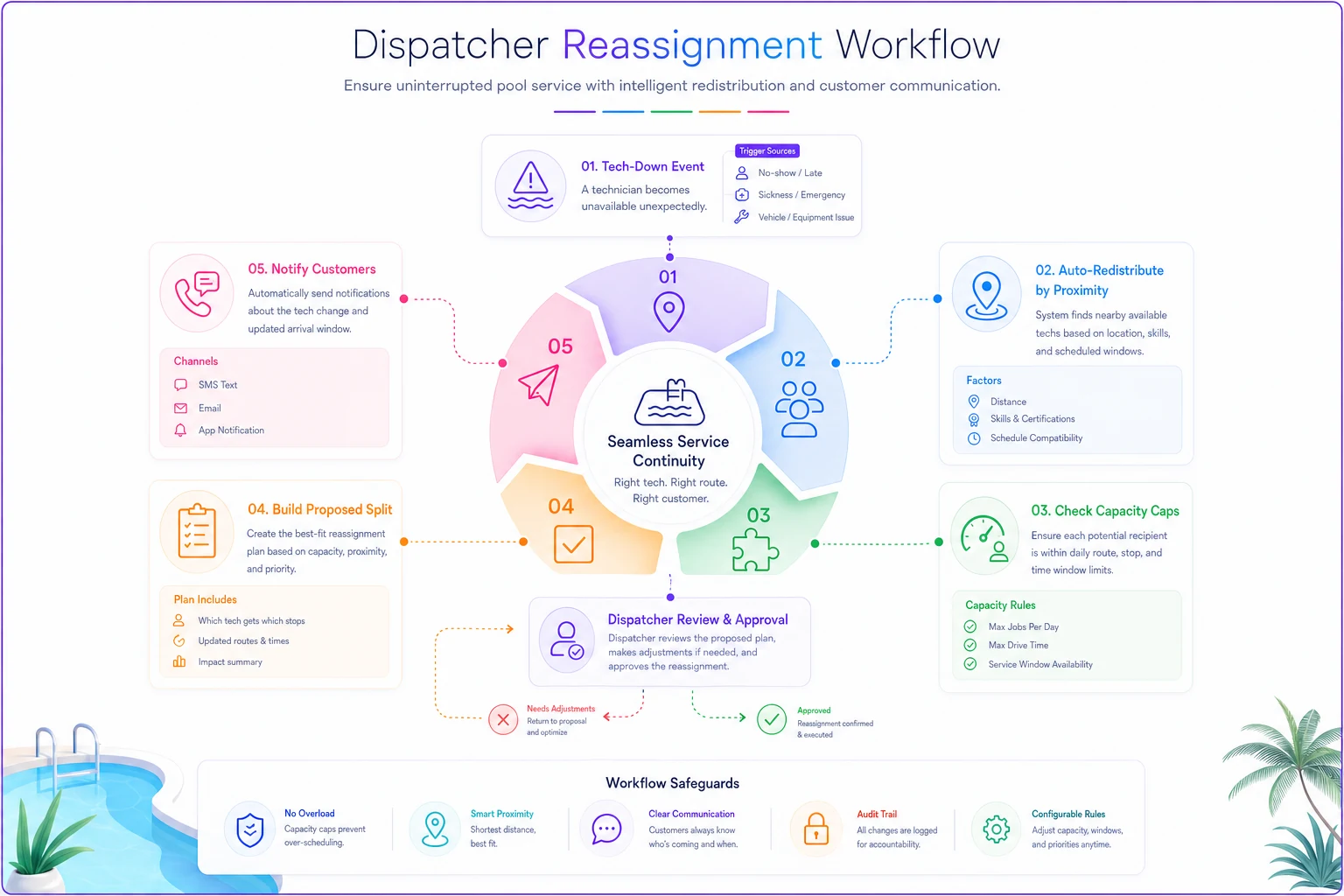
Done manually, that's 25–40 minutes of phone calls and whiteboard math while the clock ticks. Structured as rules, it's a review-and-approve decision that takes a few minutes.
Templates for Block 3
-
R1 (backfill offer) "Hi {first_name} — a slot opened up today between {window}. Want it? Reply YES and we'll lock it in."
-
R2 (tech change) "Update {firstname}: {newtech} will handle your service today, {window}. Everything else stays the same."
When Tech D's truck died in week four, the redistribution flow reshuffled the day in a few minutes instead of the usual scramble.
Block 4: Escalation matrix and dispatcher decision rules (Rules 23–30)
The last block is about deciding who acts when — so a stuck job doesn't sit invisible until a customer complains.
Rule 23 — Late-start alert
-
Trigger Tech hasn't started first job by 8:30am
-
Condition No "en route" or "unavailable" status
-
Action Ping tech; if no response in 15 min, alert dispatcher
Rule 24 — Job running long
-
Trigger Tech on-site past 2× the job's estimated duration
-
Condition No status update
-
Action Prompt tech for update; flag downstream stops as at-risk
Rule 25 — At-risk cascade notice
-
Trigger A route falls 45+ min behind schedule
-
Condition 3+ downstream stops affected
-
Action Proactively notify affected customers of revised windows via template E1
Rule 26 — Stalled job escalation
-
Trigger Job in "Needs Reschedule" > 24 hours
-
Condition No new date assigned
-
Action Escalate to operations manager
Rule 27 — Missed appointment autopsy
-
Trigger Job closed as "Missed" (neither party fault resolved)
-
Condition Any missed job
-
Action Auto-create a review ticket capturing root cause tag (access / capacity / no-show / tech-down / weather)
Rule 27 is the quiet MVP of this whole playbook. You can't fix what you don't categorize. After a month, that root-cause tag tells you exactly which of the other rules to tighten — and which problems are actually just noise.
Rule 28 — VIP/at-risk account watch
-
Trigger Any schedule change on a flagged at-risk account
-
Condition Account tagged "retention risk" or high LTV
-
Action Notify account owner directly, not just dispatch queue
Rule 29 — End-of-day incomplete sweep
-
Trigger 6:00pm
-
Condition Any confirmed job not marked complete or rescheduled
-
Action Compile incomplete list, assign to next-day priority, notify affected customers
Rule 30 — Weekly leak report
-
Trigger Sunday 6:00pm
-
Condition Always
-
Action Generate summary: missed count by root-cause tag, backfill success rate, capacity utilization by tech
Escalation matrix
| Situation | First responder | Time to escalate | Escalates to |
|---|---|---|---|
| Unconfirmed high-value job | Automation (nudge) | 4 hrs out | Dispatcher (manual call) |
| Tech down mid-shift | Automation (redistribute) | Immediate | Dispatcher approval |
| Overflow queue building | Dispatcher | 4:00pm | Ops manager |
| Stalled reschedule | Automation flag | 24 hrs | Ops manager |
| Retention-risk change | Account owner | Immediate | — |
Dispatcher scripts
-
Access hold (Rule 3) "Hi, we've got you on the route today but our tech needs the gate code to get to the equipment. Can you text it over or leave the side gate unlocked before {window}?"
-
Overflow reschedule offer "We're fully booked today and I'd rather not rush your service. I can get you first thing tomorrow at {window} — does that work?"
-
Manual confirmation call "Just confirming {tech_name} for your pool today between {window}. Anything we should know before we roll up?"
Template E1 (at-risk window)
"Hi {firstname}, running a bit behind today. Your new window is {newwindow}. Sorry for the shuffle — {tech_name} will still take good care of the pool."
Tool-integration recipes
You don't need custom development to run these. The mapping to common stacks is fairly straightforward:
-
ServiceTitan + Zapier Use ServiceTitan's job status webhooks as triggers. Route confirmation and reassignment SMS through your existing messaging integration. Capacity checks live in a Zapier filter step comparing daily job counts against your cap.
-
Jobber + Make Jobber's visit and status triggers feed Make scenarios. Make handles the branching logic well — the redistribution proposals in Rule 16 are cleaner here because of the router modules.
-
Housecall Pro + Zapier Trigger on schedule changes and job status. Housecall's built-in reminders cover part of Block 1, so start your custom rules at Block 2 to avoid double-texting customers.
One practical note regardless of platform: keep the decision in the automation and the judgment with the dispatcher. Auto-block overbooked jobs, auto-propose reassignments — but let a human approve anything a customer will feel. Fully hands-off dispatch sounds efficient right up until an edge case hits and a customer gets a bizarre experience nobody can explain.
Field platforms with built-in automation logic make this cleaner than the Zapier-glue approach, because the capacity math and status data already live in one place instead of being shuttled between tools. But the rules themselves are what matter. The plumbing is negotiable.
A real scenario: what this fixed on a 5-tech crew
A residential-heavy pool company running 5 techs and roughly 350 weekly recurring accounts was missing 9–12 appointments a week during peak summer. Once they started tagging root causes, the breakdown looked like this: about half were no-access issues (gate codes, dogs, locked equipment rooms), a third were overbooking bleed where the last stops got bumped to the next day, and the rest were tech-down days with no fast redistribution plan.
They deployed roughly a dozen of these rules — the full Block 1 confirmation cadence, the Rule 9 capacity cap set at 78, Rule 16 redistribution, and the Rule 27 autopsy tagging.
Inside about six weeks, weekly missed appointments dropped to the 2–4 range. The confirmation cadence alone killed most of the no-access misses because customers were prompted about gate access the day before. The capacity cap stopped the end-of-day bleed. And when a tech's truck died in week four, the redistribution flow reshuffled the day in a few minutes instead of the usual scramble. Nobody added staff. They just stopped leaking jobs they'd already won.
Where to start (and where not to)
Don't deploy all 30 at once — you'll drown your dispatcher in alerts and your customers in texts. A sane sequence:
-
Week 1 Block 1 confirmation rules (1, 2, 3, 4). Immediate no-show reduction, low risk.
-
Week 2 Capacity guards (9, 10, 11). Protect the ceiling.
-
Week 3 Reassignment core (16, 17, 19). The tech-down safety net.
-
Week 4 Escalation and reporting (27, 29, 30). Now you can see what's still leaking.
Run it as a simple A/B if you can: apply the confirmation cadence to half your accounts for two weeks and compare no-show rates against the untouched half. The difference is usually obvious enough that the rest of the rollout sells itself internally.
When this makes sense: any crew of 4+ techs where the dispatcher is spending afternoons firefighting instead of planning tomorrow.
When it's a bad idea: a 1–2 tech operation where the owner is the dispatcher and knows every account personally. At that scale, the automation overhead outweighs the benefit — just run tight confirmations and skip the rest.
Missed appointments on a small pool crew are almost never one big failure. They're a dozen small handoff gaps that nobody owns. These rules don't replace your dispatcher's judgment — they just make sure the boring stuff never falls through the cracks, so that judgment gets spent where it actually matters.
For the strategic layer behind these tactical rules — how to balance recurring, seasonal, and emergency demand without overbooking in the first place — the scheduling rulebook for pool services is the companion piece to read next.
Ready to elevate your pool service business?
Join hundreds of pool service professionals using Splshly to save time, optimize routes, and enhance customer satisfaction.