



Mixing residential and commercial stops on the same route looks simple until you actually try to build the day. Residential pools want quick, predictable weekly touches. Commercial accounts—hotels, HOAs, gyms, apartment complexes—come with tighter chemical windows, higher liability, longer treatment times, and sometimes a property manager watching you work. When you cram both into one territory and try to sequence them by "closest next stop," the route falls apart by mid-July.
Most owners don't need routing software to fix this. They need a few clear rules about what to batch, what to prioritize, and what to never let slide. That's what this is. A practical rulebook for pool route planning across mixed residential commercial territories that you can run with a spreadsheet, a printed map, and about twenty minutes of setup per week.
Why "nearest next stop" quietly wrecks mixed routes
The instinct is geographic. You look at a map, drop your stops, and connect the dots so you're not backtracking. That works fine when every pool is basically the same job. It stops working the moment your stops have different time shapes.
A residential pool is a roughly 20–25 minute job with a flexible window. A 400,000-gallon hotel pool with a spa and a splash pad might run 55–75 minutes, and it has a hard morning cutoff because the pool needs to be clear before guests come down at 9 or 10. A commercial refill or heavy shock treatment might require a return pass later that same day to re-test.
When you sort purely by distance, you end up doing this:
-
Hitting the big commercial job third instead of first, blowing past its clear-by deadline
-
Stacking three chemical-heavy stops back to back and running the truck low on liquid chlorine before noon
-
Ending up 25 minutes from the one account that needs a same-day recheck
The route looks efficient on paper because the drive minutes are low. The actual day is a mess because you optimized the wrong variable. Distance is only one cost. Treatment time, refill windows, and chemical load on the truck are the constraints that actually break your schedule.
The three constraints that should drive your sequencing
Before you touch the map, tag every account by three things. This is the whole foundation.
Eliminate missed appointments and dispatch delays.
Splshly ensures every pool service is scheduled, tracked, and completed efficiently.
- Unified scheduling dashboard
- Automated customer reminders
- Technician route optimization
No credit card required
1. Treatment time class. How long the stop actually takes, door to door.
2. Time-window rigidity. How much flexibility you have on when you show up.
3. Load draw. How much it pulls from your truck's finite resources—chemicals, filter media, DE, cartridges, tools.
A simple way to classify them:
| Constraint | Low | Medium | High |
|---|---|---|---|
| Treatment time | Residential weekly (~20 min) | Small commercial / large residential (~35–45 min) | Large commercial, multi-body (~60–75 min) |
| Window rigidity | Anytime that day | AM or PM half-day | Hard clear-by deadline (e.g. before 9 AM) |
| Load draw | Standard chem dose | Heavy shock / algae treatment | Refill + shock + media change |
Once every stop has three tags, the sequencing rules almost write themselves. You're no longer routing by geography alone—you're routing by which constraint is tightest.
The batching heuristics that actually hold up
These are the rules that tend to hold across real pool territories, especially in the June–August crunch when routes swell and there's no slack.
Rule 1: Anchor the day with the tightest windows first
Stops with hard deadlines go on the calendar before anything else. A hotel that needs clear water by 9 AM is a fixed point. You build the rest of the route around it, not the other way around.
In practice this means your first 90 minutes are often the least "efficient" from a drive-time view—you might drive past four residentials to reach the commercial anchor. That's fine. Missing a residential by two hours costs you nothing. Missing a hotel's clear-by window can cost you the account.
Rule 2: Batch by load draw, not just by neighborhood
This is the one most people miss. Group your high-draw stops so you know what the truck needs before you leave the yard, and so you don't run out of liquid chlorine three stops from the end. If you've got two algae remediations and a refill-and-shock on the same day, that's a serious chemical volume—sequence them so you can restock or plan the truck accordingly.
This ties directly into how you stock the truck in the first place.
If you've already built a tiered truck stocking plan and seasonal PARs, batching by load draw just means honoring those PARs on the road instead of guessing.
Rule 3: Fill the gaps with flexible residentials
Once anchors and heavy-load batches are placed, your low-rigidity residential stops become filler. They slot into the geographic gaps between the fixed points. This is where nearest-neighbor routing finally earns its keep—but only inside the structure you've already built. Residentials are the mortar, not the bricks.
Rule 4: Reserve a recheck buffer on heavy-treatment days
Any day with a big shock or algae job should carry a 30–45 minute buffer near the end for a same-day recheck or callback.
Schedule that buffer like it's a real stop. You'll stop over-promising, and you'll stop crushing your techs when the recheck inevitably comes up.
Here's a simple visual of the weekly build process.
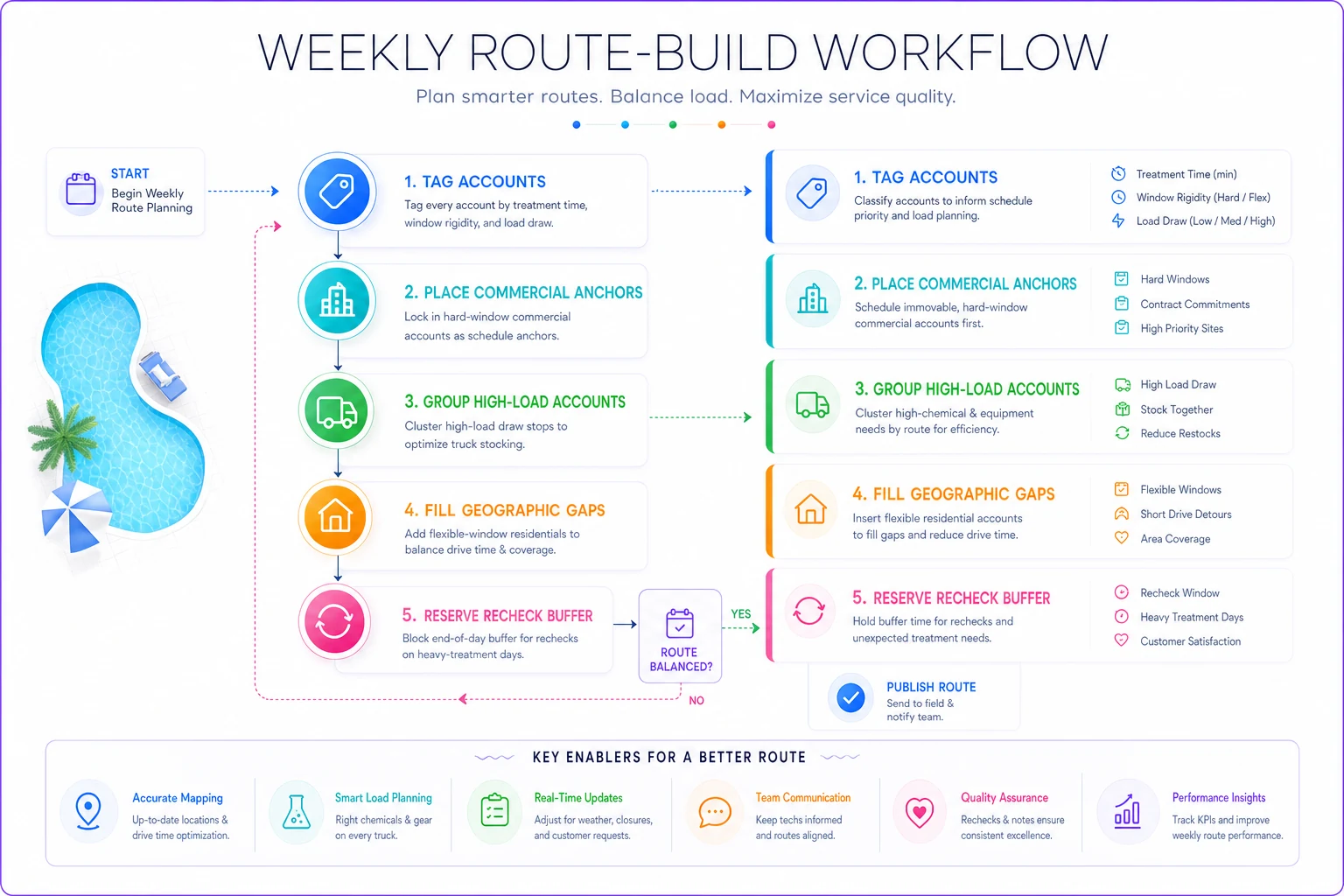
Use this to keep the sequence anchored to constraints rather than distance alone.
A simple priority-weighting formula you can do on paper
If you want something more concrete than "put the tight ones first," here's a manual scoring method. Give each stop a priority score, sequence high scores earlier in the day.
Score each stop 1–3 on these three factors, then add them:
-
Window rigidity (1 = anytime, 2 = half-day, 3 = hard deadline)
-
Consequence of a miss (1 = mild, 2 = unhappy client, 3 = liability or contract risk)
-
Treatment length (1 = short, 2 = medium, 3 = long—longer jobs earlier so a late start doesn't cascade)
A hotel with a 9 AM deadline, contract risk, and a 70-minute job scores 3+3+3 = 9. A flexible weekly residential scores 1+1+1 = 3. Run the 9s and 8s first, work down to the 3s, and slot the low scores geographically wherever they fit between the anchors.
You don't need software to do this. A column in a spreadsheet with a SUM formula handles the whole thing, and after a week or two you'll be eyeballing the scores without writing them down.
When this makes sense (and when it doesn't)
This works well when:
-
Your territory genuinely mixes residential and commercial with different time shapes
-
You're running 15+ stops per tech per day and geography alone isn't cutting it
-
You keep losing time to backtracking for rechecks or running out of chemicals mid-route
This is overkill when:
-
You run a pure residential book where every stop is basically identical
-
You've got fewer than around 8 stops a day and can hold the whole thing in your head
Who should skip the scoring formula: a solo operator with a tight, all-residential loop. A good map order and a solid truck-stocking habit will do more for you than a priority score ever will. The scoring shines when constraints conflict—and pure residential routes rarely have that problem.
A real scenario: three-truck operation, tourist-town territory
A mid-size pool service running three trucks in a coastal town had a mixed book—roughly 280 residential accounts and about 25 commercial (motels, two HOAs, a fitness club). Their routing was pure geography, built once in spring and rarely updated.
By July it was falling apart. Two commercial accounts complained about cloudy water at check-in because those stops kept landing mid-morning after a string of residentials. Techs were also making a lot of afternoon round-trips for rechecks, burning fuel and daylight. On a bad week they were logging what looked like five or six extra hours of drive time across three trucks that produced nothing billable.
They didn't buy routing software. They tagged every account with the three constraints, anchored commercial deadlines first, and built a recheck buffer into every heavy-treatment day. Within about three weeks the cloudy-water complaints basically stopped, and the afternoon round-trips dropped from daily to maybe one or two a week. Total drive time actually went up slightly on some routes—but productive hours per tech went up more, because they stopped doubling back. Each truck picked up room for a couple more stops a day without adding hours.
The lesson wasn't "drive less." It was "stop optimizing the wrong number."
Your weekly route-build checklist
Run this every week during peak season. It takes about 20 minutes once it's a habit.
-
[ ] Confirm all commercial deadline windows for the week (they change—events, closures, refills)
-
[ ] Tag any new or changed accounts with the three constraints
-
[ ] Place all hard-window anchors on the calendar first
-
[ ] Group high-load-draw stops and check them against truck PARs
-
[ ] Fill geographic gaps with flexible residentials
-
[ ] Add a recheck buffer to every heavy-treatment day
-
[ ] Score conflicting-constraint days with the 1–3 formula
-
[ ] Flag any day where two hard deadlines overlap—those need a second tech or a schedule move
That last one matters more than people expect. The most common blow-up isn't a bad sequence—it's two hard deadlines landing on the same tech at the same hour. Catch that during the build, not at 8:45 AM when it's too late to move anything.
Where a management platform quietly helps
None of this requires expensive routing engines, and you can absolutely run it on a whiteboard. But once you're doing it weekly across multiple trucks, the tagging and re-tagging gets tedious fast. Constraint changes—a refill added, a deadline shifted—are easy to miss when everything lives in someone's head or a shared spreadsheet nobody fully trusts.
That's where an AI-assisted operational platform starts paying for itself—not by replacing your judgment, but by keeping account tags, treatment-time classes, and window rules in one place so the same route logic runs consistently whether you build it or your lead tech does. When the rules live in the system instead of in one person's memory, a heavy-treatment day automatically carries its recheck buffer and a load-draw batch flags when it's going to exceed truck PARs. You're still setting the priorities. The software just keeps you from forgetting them when the book gets bigger.
Bottom of it all
Mixed residential–commercial routing breaks when you treat every stop as interchangeable and let distance make all the decisions. It holds together when you route by the constraint that's actually tightest—usually a commercial clear-by deadline, sometimes chemical load, occasionally a long treatment that can't start late. Anchor the rigid stops, batch by what drains the truck, fill the rest with flexible residentials, and always leave room for the recheck you know is coming.
Do that for a few weeks and the difference shows up where it counts: fewer complaints at check-in time, fewer wasted afternoon round-trips, and enough recovered hours to grow the book without adding trucks.
Ready to elevate your pool service business?
Join hundreds of pool service professionals using Splshly to save time, optimize routes, and enhance customer satisfaction.